Music Mode
The album art of the song you're playing becomes your wallpaper — extracted, blurred, and gently dropped behind your icons. Apple Music, Spotify, and anything macOS reports.
Apple Music turned the iPhone lock screen into living artwork. MOODy asks the same of the Mac desktop — the one surface Apple's living interfaces never reached.
Each mode listens to a different signal on your Mac — what's playing, what the weather's doing, what time it is, how busy your CPU is — and quietly shifts the wallpaper to match. No tabs, no triggers, no babysitting.
The album art of the song you're playing becomes your wallpaper — extracted, blurred, and gently dropped behind your icons. Apple Music, Spotify, and anything macOS reports.
CoreLocation reads where you are, the sky tells the rest — coastal blues on clear days, foggy forests when it's overcast.
Morning, afternoon, evening, night — each with its own scene. Bright at dawn, warm at sunset, quiet after dark.
Fifteen mood categories — Peaceful, Energetic, Focused, Dreamy and more. Pick how you want to feel.
When macOS Focus turns on, saturation drops and the desktop calms. When it ends, your wallpaper returns.
Mesh gradients generated live from CPU and RAM load — pastels when calm, deep navy when the fans spin up.
One evening I was listening to Apple Music. The album art was filling the iPhone lock screen, breathing softly behind the controls — a small example of how Apple has turned the iPhone lock screen, over the years, into a living surface through widgets, focus filters, and dynamic content.
A moment later I turned back to my Mac. The same song was playing, but the desktop was silent — a static Sonoma wallpaper, frozen. The contrast left a quiet observation: the Mac desktop was the one surface Apple's living interfaces never reached.
If Apple Music turns the iPhone lock screen into living artwork, why can't the Mac desktop do the same?
That question became a weekend prototype, and the prototype became MOODy. What started as Music Mode grew naturally — weather, time of day, mood, focus, Pomodoro, even CPU load became contexts the desktop could respond to.
Music, weather, time, and the always-handy menu bar — shown in detail, plus the control surface that ties everything together.
The album art of whatever song is playing becomes your wallpaper — extracted with Core Image, blurred for legibility, and applied transactionally so there's no flicker between tracks.
The original idea that started MOODy, and still the mode that surprises people the most.
MediaRemote · nowPlaying APICoreLocation asks for your location once, Open-Meteo returns the current conditions, and the engine picks a scene that matches — sunny coast, foggy forest, snow-quiet street, stormy harbor.
Open-Meteo is free and key-less. Your coordinates never touch our servers — there are no servers.
CoreLocation · Open-Meteo · Pexels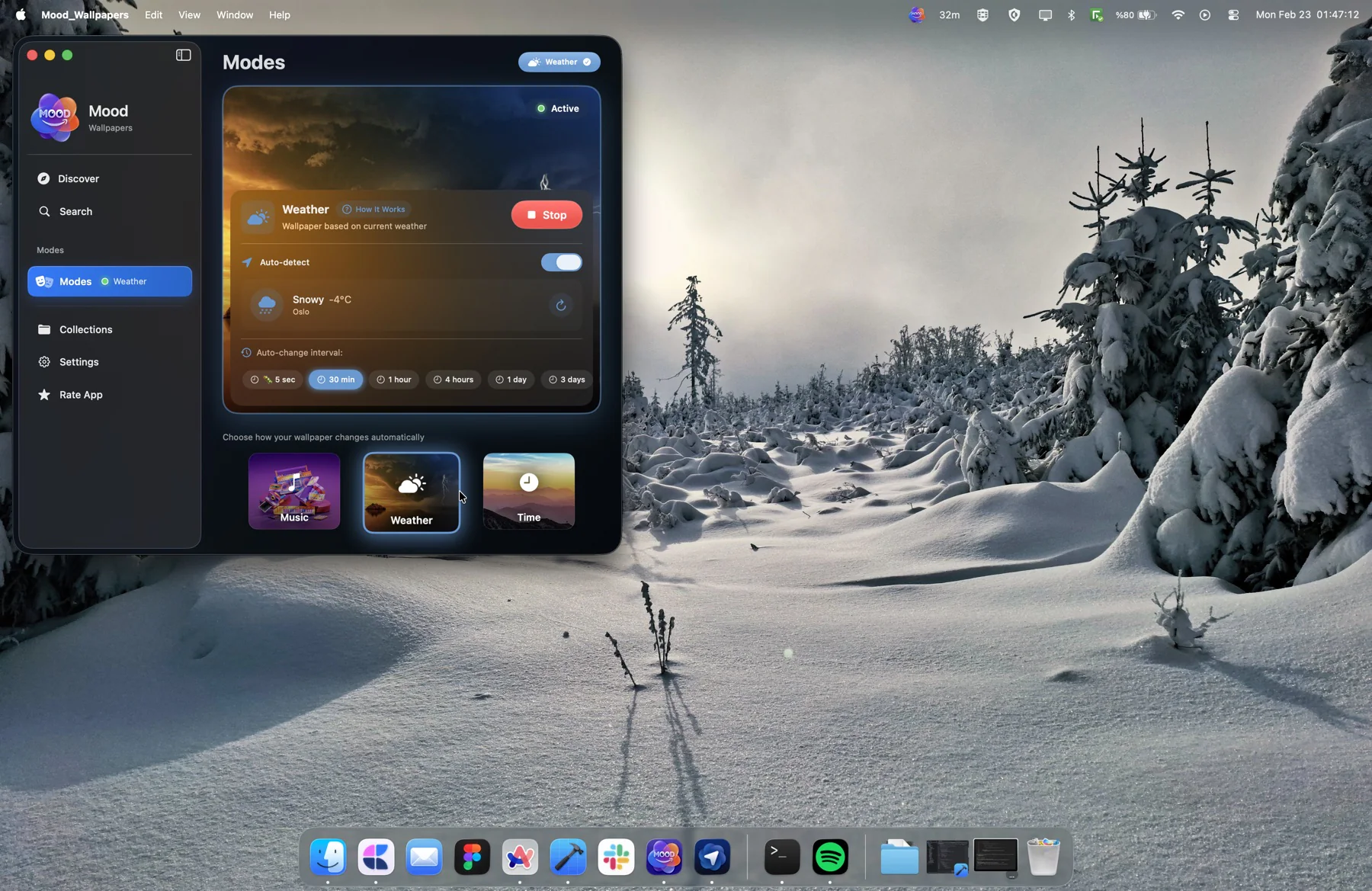
Time slots — dawn, morning, afternoon, evening, night — each with its own scene and window. Pick a wallpaper or a collection for each slot, and MOODy quietly rotates them as the day moves.
By night, the desktop is hushed in deep blues; by sunset, it warms to amber. You don't manage it — you just notice the room feels right.
Foundation · per-slot scheduler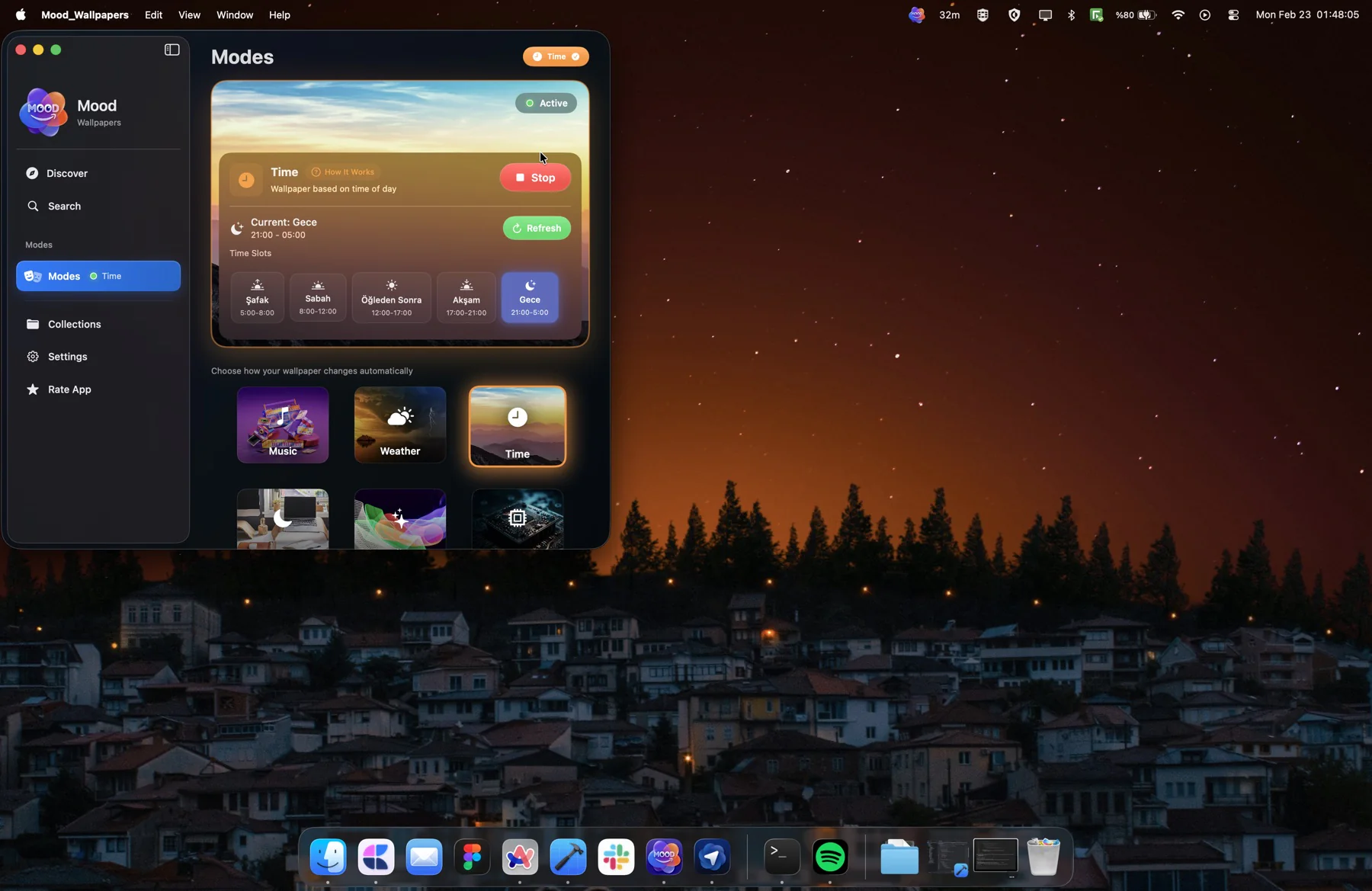
Switch modes, force a new wallpaper, see what's currently set, change the auto-rotate interval, or fire up a Pomodoro session — everything important is one click away from the menu bar.
Built with MenuBarExtra and SwiftUI, so it feels like macOS — not a third-party tray icon bolted on.
MenuBarExtra · SwiftUI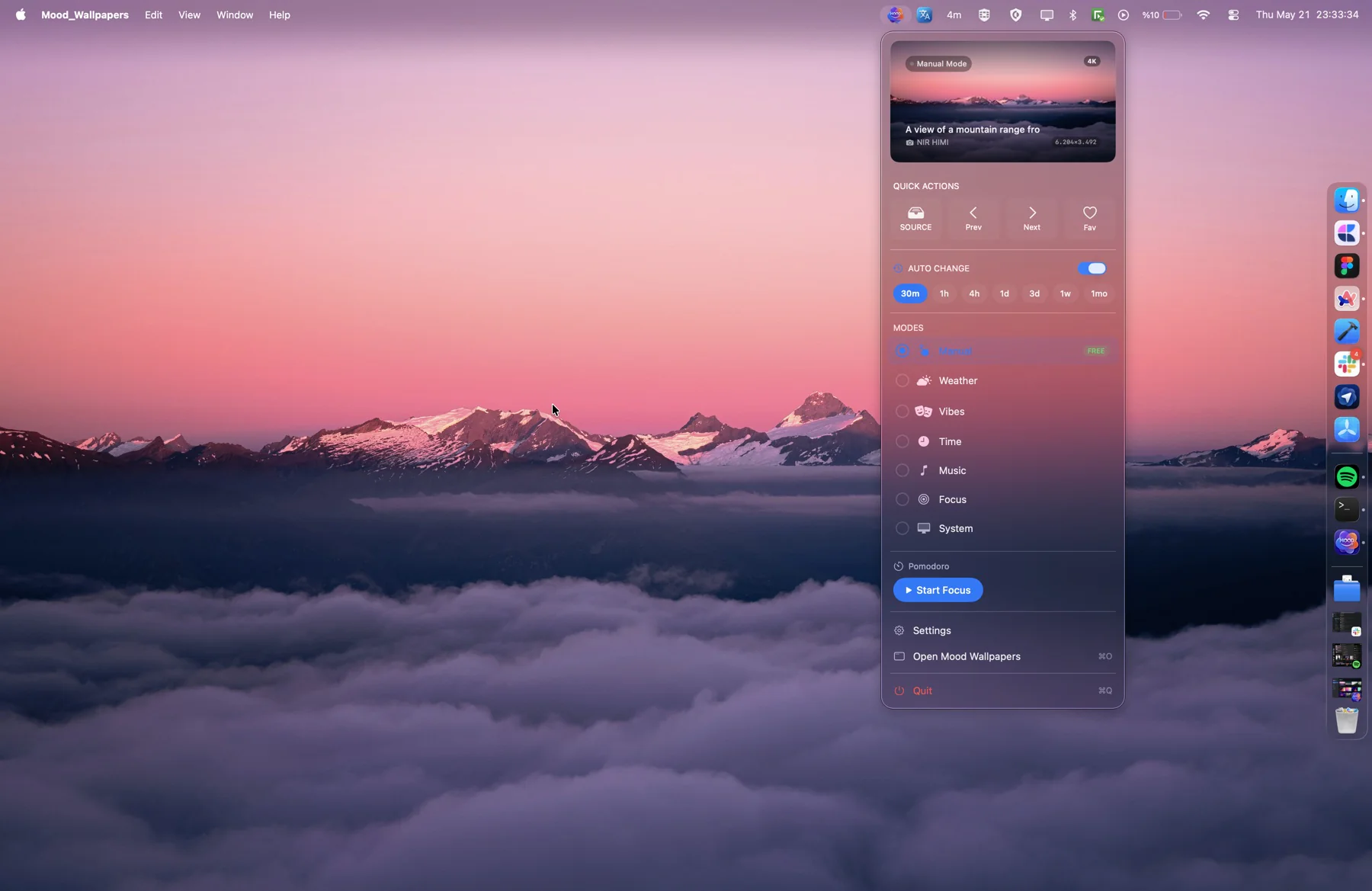
Pick a quote from the built-in library — 30+ curated lines across motivation, wisdom, creativity, and humor — or write your own. Set the typography, position, and background, and MOODy bakes it into a wallpaper-ready image.
Four presets — Minimal, Elegant, Bold, Vintage — and eight fonts including SF Pro, New York, Script, and Typewriter.
Core Image · custom typography engine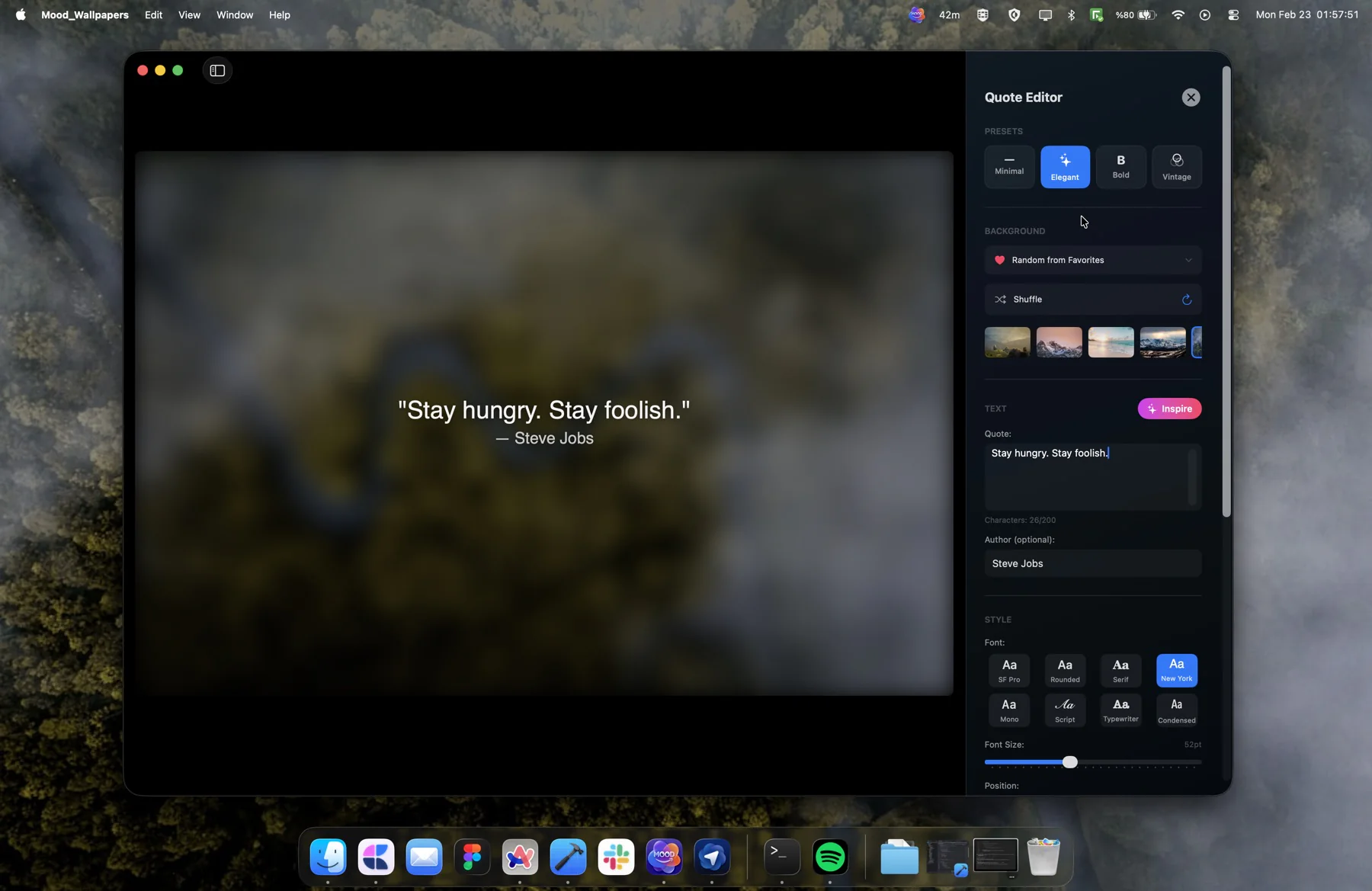
Start a 25-minute work session from the menu bar. The countdown sits next to the mode list, the wallpaper shifts to match what you're doing, and a small streak counter tallies sessions completed today.
Pause, stop, or skip without leaving whatever app you're in — two clicks from anywhere, never opening a window.
UserNotifications · MenuBarExtra · WallpaperEngine V2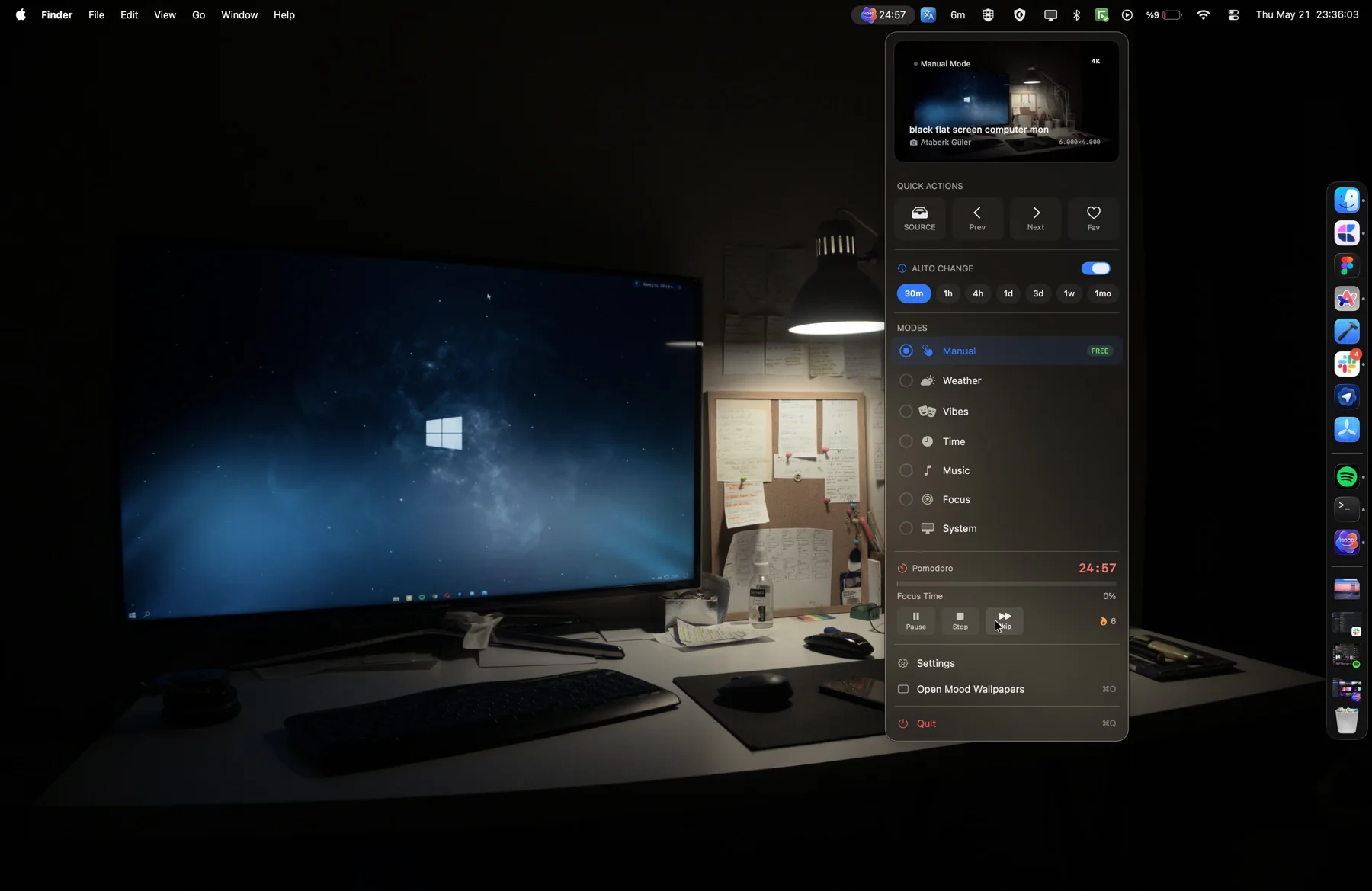
The six modes do most of the work, but Premium opens a few extra tools for people who want their desktop to do even more.
Save your favorites into named collections, then run them as a slideshow with your own interval and order. Sequential or random, two-minute cycle or two-hour — your call.
Apply to every display and every Space at once, or keep each screen on its own wallpaper. Space transitions are debounced so wallpapers don't flicker when you swipe between desktops.
Set an interval and forget it — 30 minutes, an hour, a day, a week, a month. Or let a mode drive the changes. Either way, the desktop stays fresh without you doing anything.
The Mac desktop is a sensitive surface — a single millisecond of flicker is noticeable. WallpaperEngine V2 was built specifically to keep it trustworthy.
Every wallpaper change is a transaction with a unique ID — preventing race conditions during rapid mode switches.
ImageFactory uses Swift actors for memory-safe image processing — no UI freezes, no memory bloating.
SmartApplier retries failed applications and verifies success — wallpapers that should change always do.
Mission Control transitions are coalesced (300ms) — no flicker when sliding between Spaces.
PersistenceGuard saves engine state continuously — your active mode survives unexpected restarts.
Built fully in SwiftUI for macOS 14+ — minimal CPU and battery footprint, even with multiple modes.
The questions that come up most often — about pricing, privacy, hardware, and how each mode actually works under the hood.
Free to download. Premium unlocks the intelligent modes — and starts with a free trial.
The basic facts about MOODy, and how to reach me. For interviews, embargoed access, review copies, or any other coverage — the contact below goes straight to my inbox.
Interviews, review copies, embargoed access, or just questions — I'll reply personally within a day.